
 Canada (English)
 Colombia
 Caribbean and Puerto Rico
 Ecuador
 India
India
 Indonesia
 Ireland
 Malaysia
 Mexico
 Panama
 Peru
Peru
 Philippines
 Singapore
 South Africa
 Sri Lanka
 Thailand
 United Kingdom
 United States
 AcumatiCares


Paiements intégrés dans les ERP : fonctionnement, avantages et principales fonctionnalités
Embedded payments in ERP allow businesses to accept, process, record, and reconcile customer payments through the same system used to manage invoices and accounts receivable. Customers receive a more convenient way to pay, while finance teams reduce the need to move payment information manually between separate systems.
By connecting payment processing with financial and customer records, embedded payments can accelerate payment posting, improve cash visibility, reduce reconciliation work, and provide a more consistent invoice-to-cash process. However, the available workflows, payment methods, and level of automation depend on the ERP system, payment provider, and configuration.
What Are Embedded Payments in ERP?
Embedded payments are payment-processing capabilities connected directly with an ERP system’s invoicing, accounts receivable, customer, and financial workflows. Customers can pay through an invoice, payment link, checkout experience, or self-service portal without requiring finance teams to transfer payment data manually into the ERP.
Once a payment is authorized, the connected workflow can record the transaction, apply it to the appropriate invoice, update the customer’s outstanding balance, and reflect the activity in financial records. This differs from a disconnected payment process in which employees must download transaction files, match payments with invoices, and update accounting records separately.
Embedded AR payments specifically focus on collecting customer payments and connecting those transactions with accounts receivable. The broader term “embedded payments” may also include ecommerce, point-of-sale, supplier, refund, and other payment workflows.
What Are the Benefits of Embedded Payments in ERP?
The primary benefit of embedding payments in ERP is that payment activity remains connected with the invoices, customer records, and accounting data that finance teams already manage. This can improve both the customer payment experience and the efficiency of internal financial processes.
| Benefit | How It Helps Customers | How It Helps Finance Teams |
|---|---|---|
|
Fewer Payment Steps |
Customers can pay from a connected invoice, link, or portal | Teams receive fewer payment-related questions |
|
Faster Payment Posting |
Account balances can be updated sooner | Finance teams gain more current cash visibility |
|
Automated Payment Application |
Payments can be connected with the relevant invoices | Employees spend less time matching transactions manually |
|
Multiple Payment Options |
Customers can select an available method that meets their needs | Businesses can remove avoidable payment friction |
|
Connected Reporting |
Customers receive clearer payment status information | Payment and financial data can be reviewed together |
|
Consistent Records |
Customers see more current balances and invoice statuses | Duplicate entry and data discrepancies may be reduced |
|
Centralized Oversight |
Customers have a more consistent experience | Finance teams can monitor payments, exceptions, and reconciliation in one workflow |
These benefits depend on the payment provider, ERP configuration, supported payment methods, and degree of workflow automation. Businesses should confirm how authorization, settlement, payment application, refunds, and exceptions are handled before choosing a solution.
Comment fonctionnent les paiements AR intégrés sur les factures, les portails et le processus de paiement
Although the exact workflow varies by ERP system and payment provider, an embedded accounts receivable payment generally follows these steps:
- The business creates an invoice. The ERP generates an invoice using customer, order, project, tax, and payment-term information already maintained in the system.
- The customer receives a payment option. The invoice may contain a payment link or QR code, or the customer may access the invoice through a self-service portal.
- The customer selects a payment method. Depending on the provider and region, available methods may include credit cards, debit cards, ACH, EFT, or other electronic payment options.
- The payment provider authorizes the transaction. Sensitive payment information is transmitted to the payment provider using the security controls supported by the payment environment.
- The ERP receives the payment status. The connected system records whether the transaction was authorized, declined, settled, refunded, or otherwise requires attention.
- The payment is applied to the appropriate invoice. When supported and configured, the ERP matches the payment with the open invoice and updates the customer’s balance.
- Financial records and reports are updated. Payment activity becomes available to accounts receivable, cash management, general ledger, and reporting workflows according to the organization’s configuration.
- Finance teams manage exceptions. Employees review unmatched payments, failed transactions, partial payments, refunds, disputes, and chargebacks that require additional action.
Embedded vs. Integrated Payments: What Is the Difference?
Embedded and integrated payments both connect payment processing with business software, but the terms describe different levels of connection. Embedded payments are presented as a native part of the invoice, portal, checkout, or ERP workflow. Integrated payments may use a separate payment platform that exchanges transaction information with the ERP through an application programming interface (API), connector, or file transfer.
In practice, a payment solution can be both integrated and embedded: it may rely on an external processor behind the scenes while giving customers and employees a connected experience within the ERP.
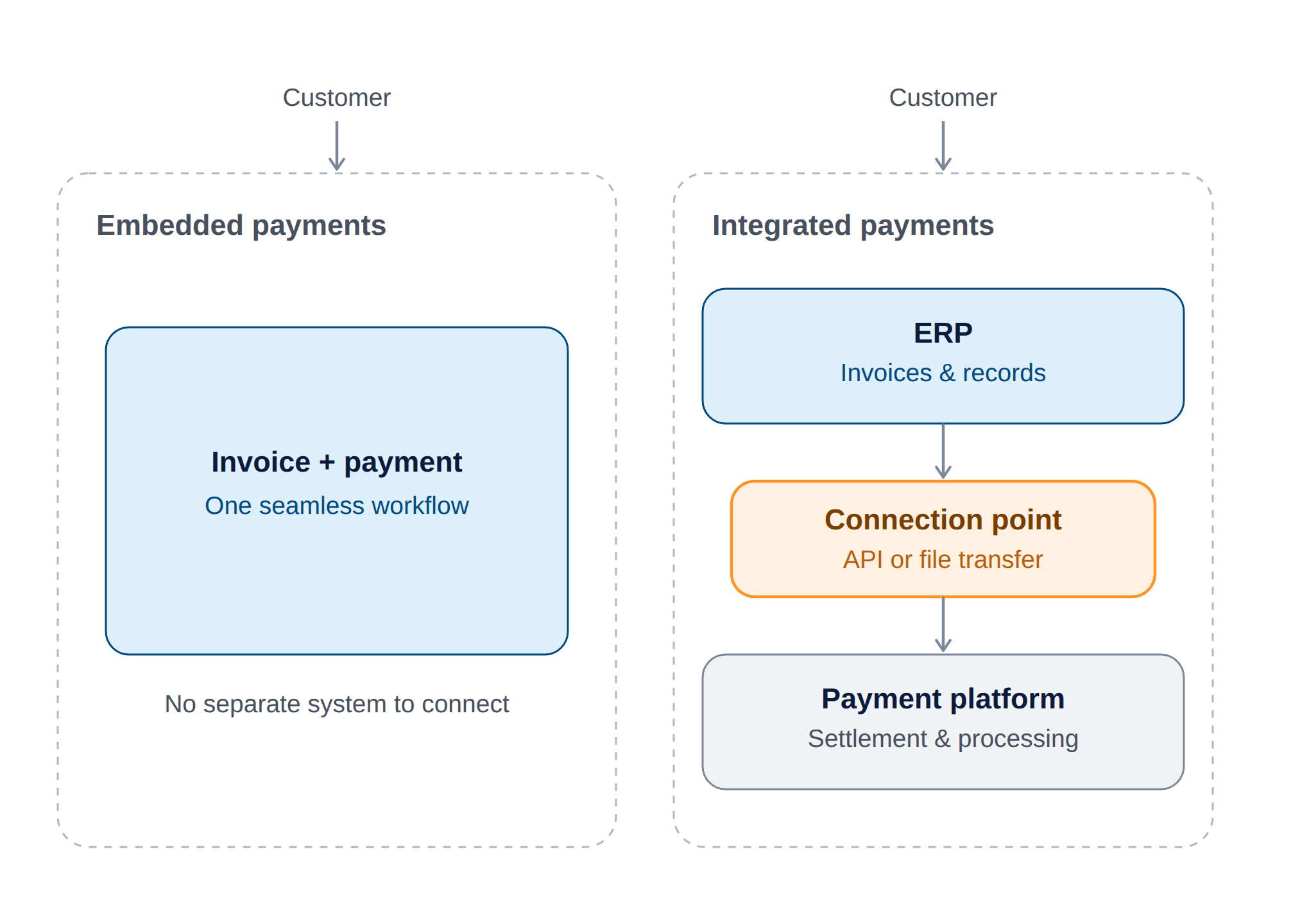
These terms are often used interchangeably, but each describes a different part of how payments connect to your ERP.
| Term | What It Means | Primary Role |
|---|---|---|
| paiements intégrés | Payment functionality presented within an ERP, invoice, portal, or checkout workflow | Creates a connected payment experience |
| Integrated payments | A payment platform that exchanges information with the ERP | Connects transaction and accounting data |
| Payment gateway | Technology that securely transmits payment information for authorization | Facilitates communication during the transaction |
| Payment processor | A provider that supports authorization, processing, and settlement | Processes the movement of payment funds |
| Automatisation de la RA | Technology that automates invoicing, reminders, collections, payment application, and reconciliation | Improves the broader receivables process |
When Does a Business Need Embedded ERP Payments?
A business should consider embedded ERP payments when disconnected systems are delaying collections, creating manual work, or limiting visibility into customer payment activity. Common indicators include:
- Customers must move between separate invoice and payment portals.
- Employees download payment files and upload them into the ERP.
- Finance teams manually match payments with open invoices.
- Customer balances are not updated promptly after payment.
- Payment errors or missing transaction details require frequent investigation.
- Reporting differs between the payment platform and the ERP.
- Refunds, partial payments, and chargebacks are difficult to track.
- Payment volume has grown beyond what the existing process can manage efficiently.
- Customers request additional electronic payment options.
- Finance leaders lack timely visibility into collected and outstanding cash.
One issue alone may not justify replacing an existing process. Businesses should compare the cost and complexity of implementation with expected reductions in manual work, payment delays, and reconciliation effort.
What Features Should Embedded ERP Payment Software Provide?
An embedded payment solution should support the complete payment lifecycle—not simply transaction authorization. Businesses should evaluate how well the solution connects customer payment options with invoices, payment application, settlement, reconciliation, security, and financial reporting.
Ces éléments essentiels sont des clés essentielles pour vous aider à rester en conformité financière et à gagner la confiance durable de vos clients.
| Zone d'évaluation | Capacités d'examen | Pourquoi c’est important |
|---|---|---|
|
Payment Methods |
Credit cards, debit cards, ACH, EFT, digital wallets, and regional options | Gives customers appropriate ways to pay |
|
Customer Experience |
Invoice links, QR codes, checkout workflows, and self-service portals | Reduces friction during payment |
|
Payment Application |
Automatic invoice matching, partial payments, and multiple-invoice payments | Reduces manual AR work |
|
Recurring Payments |
Saved payment methods, authorization controls, and recurring schedules | Supports repeat and subscription billing |
|
Transaction Management |
Authorizations, captures, voids, refunds, failures, disputes, and chargebacks | Helps finance teams manage the complete payment lifecycle |
|
Réconciliation |
Settlement matching, fee visibility, deposits, and exception handling | Helps accounting teams connect processor activity with ERP records |
|
Sécurité |
Tokenization, encryption, access controls, logging, and provider security practices | Helps protect sensitive payment information |
|
Conformité |
PCI DSS responsibilities and applicable regional or industry requirements | Helps businesses understand their compliance obligations |
|
Financial Integration |
Connections with AR, cash management, customer records, and the general ledger | Keeps payment and accounting data aligned |
|
Établissement de rapports |
Transaction status, settlement, fees, payment methods, failures, and cash visibility | Supports operational and financial oversight |
|
Évolutivité |
Supported entities, currencies, countries, volumes, and providers | Determines whether the solution can support future growth |
|
Cost Transparency |
Implementation, platform, transaction, gateway, and support fees | Helps businesses evaluate total cost |
An embedded payment solution should support the complete payment lifecycle—not simply transaction authorization. Businesses should evaluate how well the solution connects customer payment options with invoices, payment application, settlement, reconciliation, security, and financial reporting.
How Do Embedded ERP Payments Support Security?
Embedded ERP payment solutions can help reduce unnecessary exposure to sensitive payment information by using safeguards such as tokenization, encryption, provider-hosted payment fields, role-based permissions, and transaction audit trails. These controls can allow the ERP to reference payment methods without storing complete card information directly in the ERP database.
Businesses should confirm the PCI DSS responsibilities of the merchant, ERP vendor, payment gateway, and processor. They should also evaluate access controls, refund permissions, fraud-prevention tools, transaction monitoring, incident-response procedures, and how payment credentials are stored and transmitted.
No payment technology eliminates security or fraud risk. The objective is to reduce exposure, establish appropriate controls, and clearly define responsibilities across the payment environment.
What Are the Potential Disadvantages of Embedded Payments?
Embedded payments can simplify customer and finance workflows, but businesses should evaluate the potential limitations before implementation. These may include:
- Transaction, gateway, platform, and implementation fees.
- Dependence on the processors supported by the ERP vendor.
- Limited payment methods, currencies, or regional availability.
- Configuration and data-migration requirements.
- New workflows for failed payments, refunds, disputes, and chargebacks.
- Shared security and compliance responsibilities.
- Integration maintenance when the ERP or payment platform changes.
- Potential difficulty changing providers after payment processes are established.
These considerations do not necessarily outweigh the benefits. They should be included in the business case and evaluated alongside payment volume, collection performance, employee workload, customer requirements, and current system costs.
How Does Acumatica Support Embedded AR Payments?
Acumatica connects customer payment workflows with accounts receivable and related financial processes. Businesses can generate invoices, provide payment links or QR codes, give customers self-service access to account information, apply payments to open invoices, and update customer balances as payments are received.
Because invoice and payment information is connected with customer records, cash management, and the general ledger, finance teams can manage receivables without moving the same information manually among disconnected systems. Acumatica also supports workflows for payment reversals, customer refunds, multiple currencies, recurring billing, and receivables reporting.
Available payment methods, processing capabilities, geographic coverage, fees, and security responsibilities may depend on the selected payment provider and system configuration. Businesses should review these requirements with Acumatica and their implementation partner before selecting a payment approach.
Foire aux questions
What are embedded payments in ERP?
Embedded payments in ERP connect payment processing with the invoices, customer accounts, and financial records managed in the ERP system. Customers can pay through a connected invoice, link, portal, or checkout workflow, while payment information flows back to accounts receivable and related accounting processes.
What is the difference between embedded and integrated payments?
Embedded payments are presented as part of the user’s existing invoice, portal, checkout, or ERP experience. Integrated payments may use a separate payment platform that exchanges transaction data with the ERP. A solution can be both integrated and embedded when an external processor supports a payment experience presented within the ERP workflow.
How do embedded payments improve accounts receivable?
Embedded payments can reduce customer payment friction and automate the flow of transaction information into accounts receivable. Depending on the configuration, the ERP can record payments, apply them to invoices, update customer balances, and make payment information available for reconciliation and reporting.
Do embedded payments automatically reconcile invoices?
Embedded payment solutions may automatically match and apply payments to invoices when the transaction contains the necessary invoice and customer information. Partial payments, combined payments, fees, chargebacks, missing references, and other exceptions may still require review. Businesses should confirm which matching and reconciliation scenarios the system supports.
Are embedded ERP payments secure?
Embedded ERP payment solutions can use tokenization, encryption, provider-hosted payment fields, role-based access, and audit trails to help protect payment information. Security responsibilities may be divided among the business, ERP vendor, gateway, and processor, so companies should review the complete payment environment and their PCI DSS obligations.
Which payment methods can an ERP support?
Depending on the ERP system, payment provider, country, and currency, supported methods may include credit cards, debit cards, ACH, EFT, digital wallets, and other electronic options. Businesses should verify availability, settlement timing, fees, refund support, and recurring-payment capabilities for each method.
What should a business evaluate before implementing embedded payments?
Businesses should evaluate supported payment methods and processors, ERP integration, payment application, reconciliation, security responsibilities, reporting, customer experience, geographic coverage, scalability, and total cost. They should also test exceptions such as failed transactions, partial payments, refunds, disputes, and chargebacks.
Are Embedded Payments Right for Your Business?
Embedded payments can create a more connected invoice-to-cash process by bringing customer payment options, accounts receivable, and financial information into the same business workflow. Customers gain a more convenient way to pay, while finance teams can reduce manual entry, accelerate payment application, and improve visibility into collected and outstanding cash.
The right solution should do more than process a transaction. It should support payment application, exception management, reconciliation, security, reporting, and the payment methods your customers use. Businesses should compare these capabilities, along with implementation requirements and total cost, before selecting an ERP payment solution.
Acumatica connects payment processing with accounts receivable and broader financial workflows to help growing businesses manage customer payments more efficiently. Explore Acumatica’s payment processing capabilities or contact our team to discuss your requirements.


