
 Canada (English)
 Colombia
 Caribbean and Puerto Rico
 Ecuador
 India
India
 Indonesia
 Ireland
 Malaysia
 Mexico
 Panama
 Peru
Peru
 Philippines
 Singapore
 South Africa
 Sri Lanka
 Thailand
 United Kingdom
 United States
 AcumatiCares


Traditional collection methods may remain practical for businesses with low invoice volume and straightforward requirements. Automation becomes more valuable when growing transaction volume, inconsistent follow-up, reconciliation backlogs, or limited reporting visibility begin affecting collection performance.
Finance leaders evaluating these approaches should compare more than potential time savings. The decision affects financial controls, reporting accuracy, customer communication, scalability, and the organization’s ability to manage working capital.
This guide compares AR automation and traditional collection methods across the activities that matter most, explains when each approach may be appropriate, and identifies the warning signs that indicate a manual process is no longer supporting the business effectively.
AR Collections Decision Flowchart
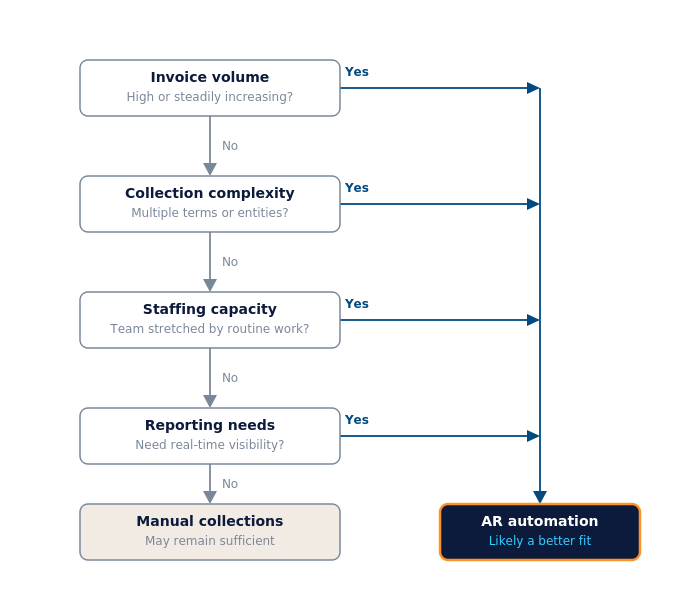
A note on professional guidance: AR automation decisions should align with your company’s accounting policies and internal controls. Finance leaders should consult qualified accounting, audit, tax, and compliance professionals, especially in regulated or multi-entity and cross-border environments.
Principaux points à retenir
- Traditional collections rely on employees to manage invoices, reminders, payment matching, and escalations manually.
- AR automation uses software workflows to standardize repetitive collection activities.
- Manual processes may remain practical when invoice volume and collection complexity are low.
- Automation becomes more valuable as transaction volume, customer count, reporting requirements, and operational complexity grow.
- ERP-connected automation can reduce duplicate entry and synchronization requirements by linking receivables with orders, payments, cash, and financial reporting.
- Companies should compare performance before and after automation using DSO, overdue balances, payment-application accuracy, collection effectiveness, and staff effort.
What Is the Difference Between AR Automation and Traditional Collections?
Traditional collections depend on employees to complete and coordinate routine accounts receivable activities. AR automation performs repeatable activities through configurable workflows and directs employee attention toward exceptions and decisions requiring human judgment. The practical differences appear in consistency, speed, visibility, financial controls, and the ability to manage higher transaction volumes.
What Are Traditional Collection Methods?
Traditional collection methods are employee-managed processes that use spreadsheets, emails, phone calls, calendar reminders, and manual payment matching. Although these methods can work at low transaction volumes, maintaining consistent follow-up and accurate reporting becomes more difficult as the business grows.
What Is AR Automation?
AR automation uses software workflows to handle repetitive collection activities, including invoice delivery, payment reminders, dunning, cash application, escalation, and reporting. Employees continue to manage disputes, collection policies, customer relationships, and unusual transactions.
| Zone d'évaluation | Traditional Collections | AR Automation |
|---|---|---|
|
Livraison de la facture |
Employees prepare and send invoices individually | Invoices are generated and delivered through defined workflows |
|
Rappels de paiement |
Staff track due dates and contact customers manually | Reminders follow configurable schedules and customer rules |
|
Cash Application |
Payments are manually matched with open invoices | Matching rules automate routine payment application |
|
Établissement de rapports |
Reports may require data from multiple files or systems | Reports update as connected transactions are processed |
|
Credit Controls |
Employees monitor limits and overdue balances | Rules and alerts identify limits, risks, and exceptions |
|
Consistency |
Processes may vary by employee or customer | Workflows apply established policies more consistently |
|
Évolutivité |
Higher volume usually requires more staff effort | Volume can increase without proportional manual work |
|
Human Involvement |
Staff manage routine and exceptional activities | Staff concentrate on exceptions and customer decisions |
|
Implementation Effort |
Limited technology setup may be required | Data preparation, workflow configuration, testing, and training are required |
|
Meilleure adaptation |
Low volume and straightforward requirements | Growing volume, complexity, entities, or reporting requirements |
Where Do Traditional Collection Methods Begin to Fall Short?
- Data-entry errors: Manual entry increases the risk of incorrect amounts, account codes, and duplicate records.
- Payment matching errors: Missing or inconsistent remittance information makes payments harder to match with open invoices.
- Reconciliation backlogs: Unapplied payments leave customer balances and cash reports outdated.
- Inconsistent follow-up: Reminder timing may depend on employee availability and individual tracking methods.
- Limited visibility: Fragmented or delayed data makes it harder to identify collection priorities and cash-flow risks.
- Staffing constraints: Increasing invoice volume creates additional work that may require proportional increases in staff capacity.
These limitations do not mean every manual process must be replaced. The decision depends on whether the company can continue managing its collection volume consistently, accurately, and cost-effectively.
How Does ERP Integration Change the Comparison?
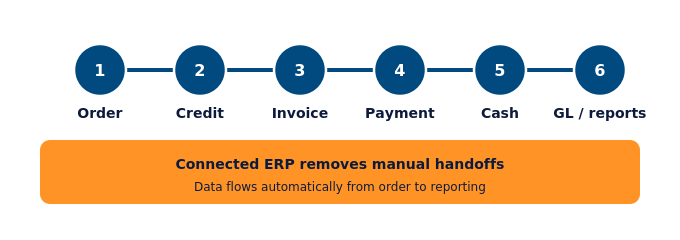
Integration is an important difference when comparing traditional and automated collections. A manual process may require employees to move information between customer records, sales orders, invoices, bank activity, spreadsheets, and the general ledger. ERP-connected automation can reduce those handoffs by using shared data across the order-to-cash process.
In Acumatica, accounts receivable activities connect with sales orders, customer records, payments, cash management, and the general ledger. This allows invoice, credit, payment, and reporting information to move through connected financial workflows while maintaining an audit trail.
Comment l'analyse du cycle de commande-encaissement améliore les décisions de recouvrement
L'analyse du cycle de facturation fournit aux équipes financières les données nécessaires pour prioriser les encaissements, suivre l'ancienneté des créances, évaluer les tendances de paiement et identifier les points de blocage tout au long de ce cycle. Sans analyse intégrée, les gestionnaires découvrent souvent les problèmes de trésorerie une fois qu'ils ont déjà eu un impact sur les opérations.
Le rapport pratique du cycle de facturation comprend le classement des factures impayées par ancienneté (regroupement selon leur durée de retard), l'évolution du DSO (délai moyen de recouvrement), l'efficacité du recouvrement par segment de clientèle, le statut de paiement par facture, ainsi que le volume et le taux de résolution des litiges. Ces indicateurs opérationnels permettent aux entreprises de prendre des décisions en matière de crédit, de définir leurs priorités en matière de personnel et d'établir leurs prévisions de trésorerie.
Pour les dirigeants, le résultat le plus important n'est pas un tableau de données, mais une réponse claire à deux questions pratiques : « Quels comptes nécessitent une attention particulière aujourd'hui ? Et quel sera l'impact probable sur la trésorerie le mois prochain ? Les tableaux de bord connectés aux données ERP en temps réel permettent d'obtenir ces réponses presque instantanément, sans attendre un rapport manuel. La détection d'anomalies basée sur l'IA d'Acumatica aide également les équipes financières à identifier les tendances inhabituelles dans les données de créances, telles que les anomalies de comportement de paiement ou les dépassements de marge, ce qui permet de prendre des décisions plus rapides et plus éclairées.
Les fonctionnalités de gestion des commandes d'Acumatica étendent cette visibilité en amont, reliant l'activité des commandes à l'état des factures et des paiements, afin que les équipes financières et opérationnelles partagent la même vision de la santé des comptes clients.
Which Capabilities Create the Biggest Differences Between Manual and Automated Collections?
Growing finance teams should evaluate AR automation against eight foundational capabilities, which directly affect collection consistency and cash visibility.
| Collection Activity | Approche manuelle | Capability to Evaluate |
|---|---|---|
|
Livraison de la facture |
Employees generate and send invoices | Scheduled generation and electronic delivery |
|
Payment Follow-Up |
Staff monitor due dates and send reminders | Configurable reminders and dunning workflows |
|
Payment Matching |
Staff match payments with invoices | Rules-based cash application and exception handling |
|
Collection Prioritization |
Employees review spreadsheets and aging reports | Alerts, dashboards, aging analysis, and risk indicators |
|
Gestion du crédit |
Limits and overdue balances are reviewed manually | Credit-limit enforcement and approval workflows |
|
Escalade |
Actions depend on staff awareness | Rules based on age, balance, customer, or risk |
|
Établissement de rapports |
Reports are assembled periodically | Connected dashboards and transaction-level drill-down |
|
Commandes |
Oversight depends on manual review | Permissions, approvals, audit trails, and exception workflows |
Other supplementary features, such as customer self-service portals, multi-currency support, and advanced financial analytics, are also important, but they depend on these foundational capabilities to function properly.
Pour un aperçu plus détaillé des fonctionnalités d'Acumatica en matière de gestion des comptes clients et de finances complète, consultez les présentations des logiciels de gestion des comptes clients et des logiciels de gestion financière .
How Do Dunning and Credit Controls Differ Between the Two Approaches?
In a traditional collection process, employees monitor aging reports, determine which customers need follow-up, prepare communications, and decide when an account should be escalated. The quality and timing of these activities may vary depending on workload and staff availability.
In an automated process, predefined rules can trigger reminders, dunning notices, credit alerts, and escalation tasks based on due dates, aging categories, balance thresholds, or customer classifications. Employees remain responsible for determining the policies, reviewing exceptions, and handling sensitive customer situations.
Automation should support—not replace—appropriate human judgment. Communication frequency, tone, escalation rules, and credit policies should reflect the company’s customer relationships, internal controls, and applicable requirements.
When Should a Company Switch from Traditional Collections to AR Automation?
A company should consider switching when manual collection activities begin limiting consistency, visibility, or growth. There is no universal invoice-volume threshold because the decision also depends on customer count, payment complexity, staffing capacity, entities, currencies, and reporting requirements.
Envisagez d'évaluer l'automatisation des comptes clients et les flux de travail financiers reliés à votre ERP si votre équipe rencontre l'un des problèmes suivants :
- Le volume des factures a augmenté plus rapidement que la capacité de l'équipe de gestion des comptes clients.
- Le délai moyen de recouvrement des créances (DSO ; le nombre moyen de jours nécessaires pour encaisser un paiement après une vente) est en hausse depuis deux trimestres consécutifs ou plus.
- La précision des prévisions de trésorerie a diminué malgré des revenus stables.
- Le rapprochement des paiements entraîne régulièrement un arriéré sur la période suivante.
- Les clients reçoivent des communications incohérentes ou tardives concernant les soldes impayés.
- Les décisions en matière de crédit sont basées sur des informations qui datent de plusieurs jours lorsqu'elles parviennent au décideur.
- Le nombre de litiges augmente sans qu'il existe un processus de résolution clair.
- Les dirigeants financiers n'ont pas de visibilité en temps réel sur la situation des comptes clients de l'entreprise.
- Collection activity is increasing faster than revenue or transaction volume.
- Additional employees are needed primarily to complete repetitive collection tasks.
- Managers cannot determine which accounts require immediate attention.
- Different employees follow different reminder or escalation processes.
- Customer, invoice, and payment information must be reconciled across multiple systems.
En résumé : lorsqu'une équipe en pleine croissance qui fait plus de travail produit des résultats identiques ou inférieurs, les processus qui ont permis à l'entreprise d'atteindre ce stade de croissance deviennent le problème.
Which Collection Approach Is the Better Fit?
| Business Condition | Traditional Collections May Be Sufficient | AR Automation May Be Appropriate |
|---|---|---|
|
Invoice Volume |
Low and relatively stable | High or steadily increasing |
|
Collection Complexity |
Straightforward payment terms and few exceptions | Multiple terms, customer groups, entities, or exception types |
|
Staffing |
Team has sufficient capacity | Routine work is limiting higher-value activities |
|
Établissement de rapports |
Periodic reporting meets management needs | Leaders need current aging, risk, and cash visibility |
|
Follow-Up |
Staff can communicate consistently | Reminders are delayed or inconsistent |
|
Réconciliation |
Payments are easy to identify and apply | Matching creates recurring backlogs |
|
Croissance |
Limited near-term change expected | Customer and transaction volume are expanding |
How Can a Company Move from Traditional Collections to AR Automation?
Moving from traditional collections to AR automation should be a phased process rather than an immediate replacement of every manual activity. The objective is to automate repetitive work while preserving the controls, customer relationships, and human judgment required for exceptions and sensitive collection decisions.
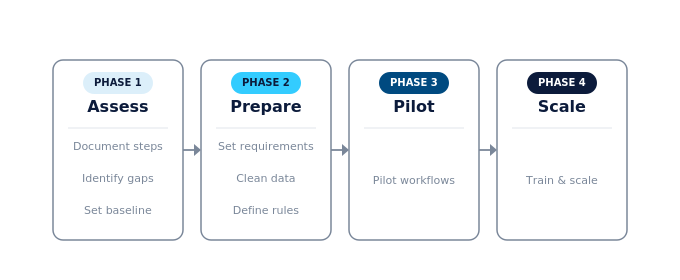
- Document the current process. Map how the company handles invoice delivery, payment reminders, payment matching, disputes, escalation, credit decisions, and reporting. Identify the employees and systems involved at each stage.
- Identify the largest manual bottlenecks. Determine which activities create the most delays, errors, inconsistent follow-up, or staff effort. These areas should become the initial priorities for automation.
- Establish baseline measurements. Record DSO, overdue balances, payment-application accuracy, collection effectiveness, dispute resolution time, and staff effort. Set specific goals that can be used to evaluate whether automation improves performance.
- Define requirements and evaluate the technology. Determine which workflows must be automated and whether the solution can connect with customer records, invoices, payments, cash management, and the general ledger. Finance teams should also evaluate reporting, security, approval, audit-trail, and integration requirements.
- Clean customer and invoice data. Review customer contact information, payment terms, credit limits, open balances, invoice status, and dispute records. Automating incomplete or inaccurate data can accelerate errors instead of improving collections.
- Define rules, controls, and responsibilities. Establish reminder schedules, escalation criteria, approval requirements, credit policies, and the situations that require human review. Assign responsibility for monitoring exceptions and maintaining the workflows after implementation.
- Pilot high-impact workflows. Begin with activities such as invoice delivery, payment reminders, or routine payment matching. Testing a limited number of workflows allows the team to identify problems before expanding automation across the entire collection process.
- Train employees, measure results, and expand gradually. Make sure employees understand which activities are automated, which exceptions require their attention, and how their responsibilities will change. Review performance over several billing cycles and expand automation only after the initial workflows produce reliable results.
A phased transition helps finance teams compare automated results with their previous manual performance. It also gives the organization time to refine its data, policies, controls, and employee responsibilities without disrupting customer communication or day-to-day collections.
How Does ERP Integration Change the Comparison?
Connecting accounts receivable with cash management and accounts payable also gives finance leaders a more complete view of working capital. AR shows expected incoming cash, while AP shows upcoming outgoing payments. For a broader explanation of how these functions work together, read Acumatica’s guide to ERP for accounts payable and accounts receivable.
Order to cash flow diagram
How Should Companies Measure Manual and Automated Collection Performance?
To determine whether AR automation improves collection performance, companies should compare results against a documented manual-process baseline. The comparison should use consistent KPI definitions, data sources, and reporting periods so that changes can be measured reliably. Because no single metric provides a complete view, finance leaders should evaluate collection speed, overdue exposure, accuracy, staff effort, and forecasting together.
| KPI | What It Reveals | Comparison Use |
|---|---|---|
|
Days Sales Outstanding |
Average collection time | Compare collection speed before and after automation |
|
Aging Bucket Distribution |
Where unpaid balances are concentrated | Determine whether fewer invoices move into older buckets |
|
Collection Effectiveness Index |
Percentage of collectible receivables collected | Measure overall collection performance |
|
Payment-Application Accuracy |
Percentage of payments matched correctly | Evaluate whether automation reduces matching errors |
|
Total Overdue Balance |
Value of past-due invoices | Identify changes in collection exposure |
|
Dispute Resolution Time |
Time required to resolve invoice disputes | Confirm whether connected workflows reduce delays |
|
Staff Time per Collection Cycle |
Administrative effort required | Measure whether repetitive work has declined |
|
Cash-Forecast Accuracy |
Difference between projected and actual receipts | Evaluate whether visibility has improved |
Le suivi de ces indicateurs vise à améliorer la prévisibilité, accélérer la conversion des liquidités, simplifier les rapports et réduire les interventions manuelles. Voici un cadre de mesure pratique :
- Établir une base de référence des performances actuelles pour chaque indicateur clé de performance avant d'apporter des modifications, en utilisant au moins 90 jours de données.
- Automatisez les flux de travail prioritaires en fonction des lacunes les plus importantes, en commençant par la livraison des factures, les rappels de paiement et l'encaissement.
- Analyser les tendances à 60 et 90 jours après la mise en œuvre pour évaluer si les indicateurs clés de performance évoluent dans la bonne direction.
- Ajustez les politiques en fonction des données recueillies, en ajustant au besoin la fréquence des relances, les seuils de crédit ou les règles d'escalade.
Ce cadre favorise une démarche d'amélioration continue plutôt qu'une mise en œuvre ponctuelle. Les définitions des indicateurs clés de performance (KPI) et les méthodes de mesure doivent être conformes aux politiques comptables de votre organisation et validées par la direction financière avant le début de la mise en œuvre.
Choisir le bon modèle de réalité augmentée pour la maturité de l'équipe des finances
AR automation and traditional collections can both be workable approaches, but they fit different operating conditions. Manual collections may remain appropriate for businesses with low invoice volume, limited complexity, and sufficient staff capacity. Automation becomes more valuable when growth creates inconsistent follow-up, reconciliation backlogs, limited cash visibility, or increasing administrative work.
Finance leaders should base the decision on measurable process limitations rather than adopting automation simply because it is available. Document the current workflow, establish baseline metrics, identify the most significant bottlenecks, and determine whether automation would improve consistency, controls, visibility, and scalability.
Acumatica connects accounts receivable with sales orders, payments, cash management, and the general ledger. Explore Acumatica’s accounts receivable capabilities to see how ERP-connected workflows can support a growing finance organization.
Foire aux questions
What is the main difference between AR automation and traditional collections?
Traditional collections require employees to track invoices, send payment reminders, contact customers, match payments, and update reports manually. AR automation uses configurable software workflows to perform these routine activities consistently. Employees remain responsible for exceptions, disputes, credit decisions, collection policies, and customer relationships.
Is AR automation always better than manual collections?
No. Manual collections may be sufficient for companies with low invoice volume, straightforward payment terms, few exceptions, and enough staff capacity to follow up consistently. AR automation becomes more valuable as transaction volume, customer count, reporting requirements, and collection complexity increase. The better approach depends on the company’s needs, resources, and growth plans.
When should a company switch from manual collections to AR automation?
A company should consider AR automation when manual processes begin limiting collection performance or growth. Warning signs include increasing DSO, recurring reconciliation backlogs, inconsistent customer follow-up, rising overdue balances, limited cash visibility, and employees spending more time on repetitive administration than on disputes, analysis, and customer relationships.
What collection activities can be automated?
Companies can automate invoice generation and delivery, payment reminders, dunning notices, routine cash application, credit-limit alerts, collection prioritization, escalation tasks, and aging reports. Activities involving disputes, unusual transactions, sensitive customer situations, or changes to credit policies should continue to include appropriate employee review and approval.
Does AR automation replace accounts receivable employees?
AR automation does not eliminate the need for accounts receivable employees. It reduces repetitive work such as sending routine reminders, matching straightforward payments, and updating reports. Employees can then devote more attention to payment disputes, complex accounts, credit decisions, customer communication, process improvement, and other activities requiring experience and judgment.
How can a company compare results before and after AR automation?
Before implementation, establish baseline measurements for DSO, aging distribution, overdue balances, collection effectiveness, payment-application accuracy, dispute resolution time, cash-forecast accuracy, and staff effort. Review the same metrics approximately 60 and 90 days after implementation, using consistent definitions and reporting periods. Account for changes in sales volume, customer mix, payment terms, and seasonality when interpreting the results.
What are the disadvantages of AR automation?
Potential disadvantages include implementation costs, integration requirements, employee training, workflow maintenance, and dependence on accurate customer and invoice data. Poorly configured rules can also produce inappropriate reminders or escalations. Companies can reduce these risks through a phased implementation, clearly defined policies, testing, data preparation, and human review of exceptions and sensitive customer communications.
Is ERP-connected AR automation better than a standalone collection tool?
Neither approach is universally better. ERP-connected AR automation can reduce data handoffs by linking collections with customer records, sales orders, invoices, payments, cash management, and the general ledger. A standalone tool may offer specialized collection capabilities or a simpler deployment. Companies should compare integration reliability, functionality, controls, scalability, implementation effort, and total cost based on their requirements.


